Sharing Chat with Your Team
Last updated: June 2, 2026
Effortlessly collaborate with your team by sharing chat threads in Kantiv. This feature makes it simple to ensure everyone is on the same page, enhancing team productivity and communication.
How to Share a Chat
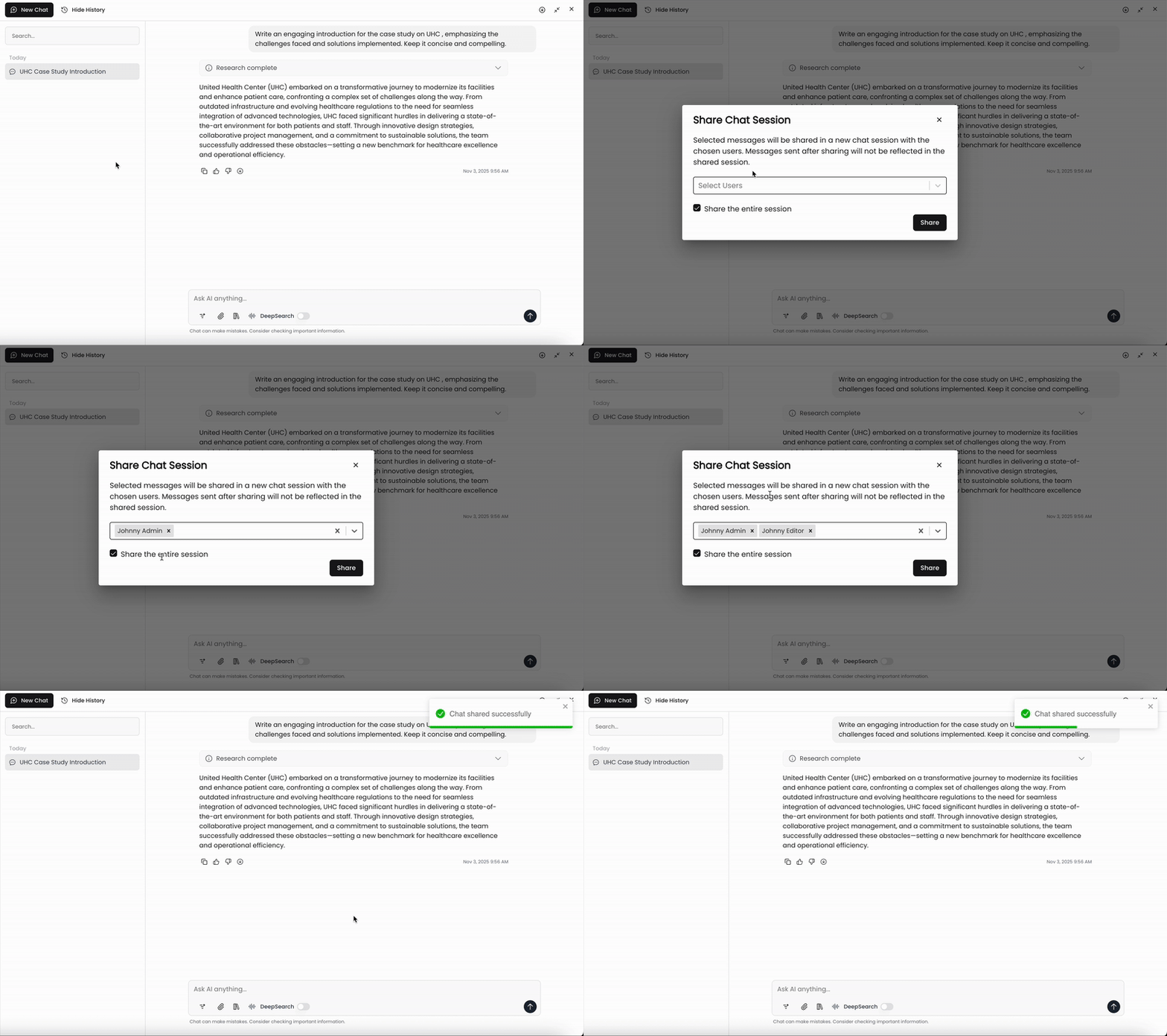
Hover over the chat session title on the left panel and click on the three dots to populate a dropdown menu.
Click Share.
Open the dropdown menu and select the users you'd like to share the chat session with. These users should already be set up in your Kantiv domain.
Toggle if you'd like to share the entire session or a specific prompt and response within that session.
Click Share.
Once complete, the shared chat thread will show up on your team member's account.
Pro tip: Copy the browser URL and share it with the team member once you're done with the steps above for quicker access.
Benefits of Sharing Chats
Enhanced Collaboration: Easily share important information and discussions with team members, keeping everyone in the loop.
Improved Efficiency: Quickly bring others into the conversation, reducing the time spent on updates and follow-ups.
Centralized Information: Keep all relevant chat threads accessible to team members, ensuring important details are never lost.
By leveraging this feature, you can ensure seamless communication and collaboration within your team.
You can always find more information on Search and Chat in our Support Center. Please send any questions or feedback to Support@Kantiv.com.