How to File a Feature Request
Last updated: June 3, 2026
If you have an idea for an improvement or a new capability that would make the Kantiv platform even more valuable for you and your team, please share your ideas with us! You can easily submit a feature request directly through the platform. Our Product and Support teams review each request, evaluate it for feasibility and impact, and keep you informed as it moves through our review process.
This article provides insight on how to submit a feature request, best practices for sharing helpful context, and what to expect once your request has been received.
Feature Requests
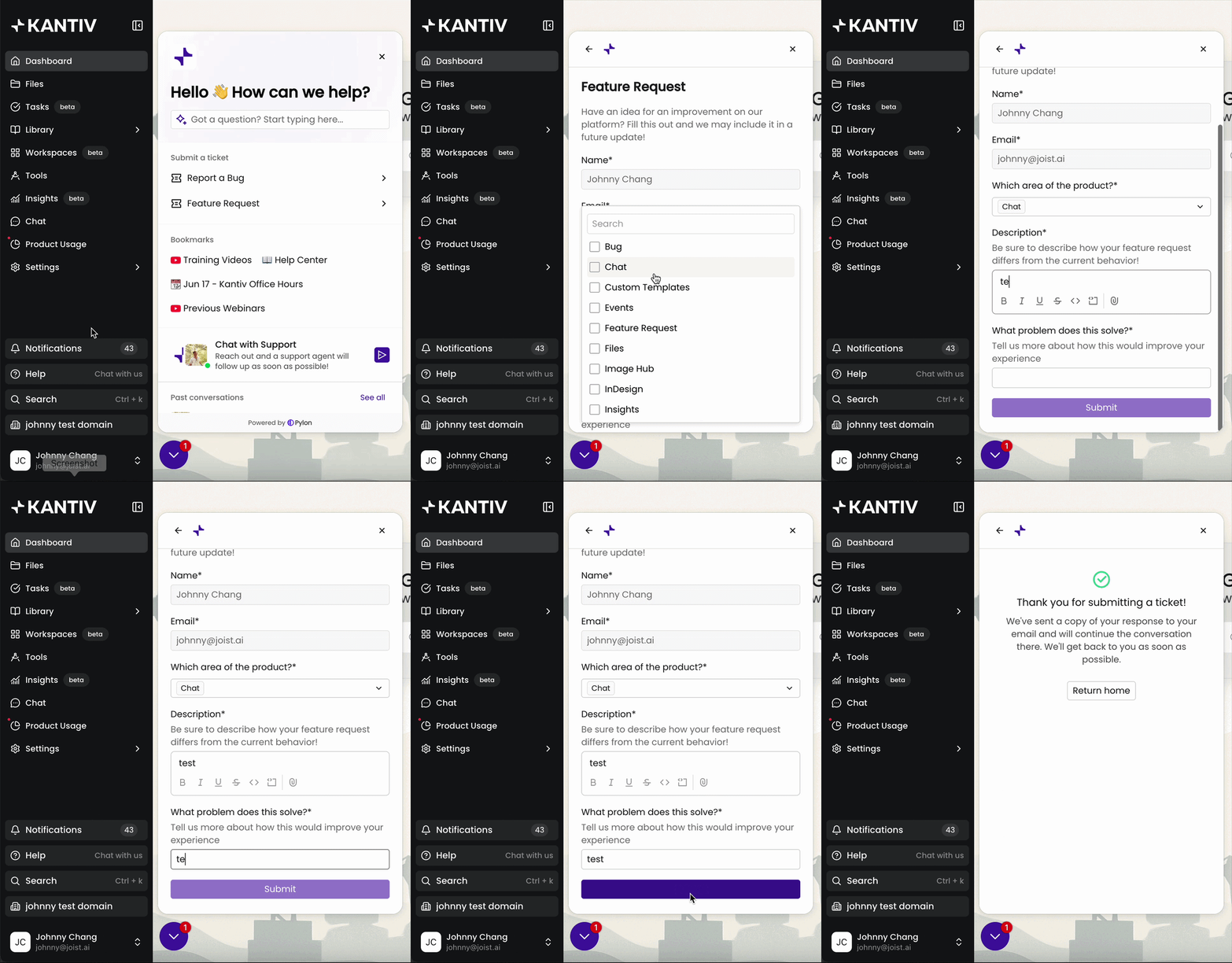
The best way to submit a feature request on the Kantiv platform is through the Help tab on the left-hand menu. There, you’ll find a form designed to capture the details we need to understand your idea and its value to your workflow.
Once submitted, you’ll receive an email confirmation with your form responses. Shortly after, you can expect a follow-up message from our support team acknowledging receipt or asking for additional details that may help us better evaluate your request.
Alternative Reporting Methods
You can also start a chat within the same Help tab to connect with our support team. An agent will follow up via chat at their earliest availability.
You can also email support@kantiv.com and your message will show up in our support platforms for an agent to follow up directly via email. Agents will follow up within the same thread and provide updates or request additional information.
Best Practices
When submitting a feature request, we recommend providing as much helpful context as possible so our team can fully understand the problem you're trying to solve. Useful details include:
A clear one-liner summarizing the feature you’re requesting
A description of the challenge or workflow gap this feature would address, including the impact on you or your organization
An explanation of your ideal or expected experience if this feature existed
Any relevant screenshots, screen recordings, or examples that help us visualize your idea
The steps in your current workflow that this feature would improve
Any relevant URLs or links that help us understand the context
Articulating feature ideas can sometimes be tricky. If you’d prefer to discuss your idea live, you can email support@kantiv.com to request a quick call with a support agent!
Review and Follow Up Expectations
Because each feature request varies in scope, priority, and technical complexity, timelines for review or adoption can differ. Kantiv support will provide timely updates as your request moves through our evaluation process.
You can also stay updated on platform performance and system-wide changes via our Status page, where we share updates about degraded performance, outages, and resolutions.
When you share feature requests, you help us prioritize what matters most and continue building a platform that supports your success. We appreciate your feedback and collaboration as we make Kantiv even better.
You can always find more User Resources in our Support Center. Please send any questions or feedback to Support@Kantiv.com.