Bug Reporting and Best Practices
Last updated: June 3, 2026
Sometimes, you may encounter a feature on the Kantiv platform that doesn’t function as expected. To bring this to our attention, you can easily submit a bug report directly through the platform. Our support team will review your report, triage the issue, and provide timely updates on its status.
This article will provide insight on how to report a bug, reporting best practices, and resolution expectations and next steps once we've received the report.
Bug Reporting
The best way to report a bug on the Kantiv platform is through the Help tab on the left hand menu. You can fill out a form that requests specific information to get a better understanding of what you're experiencing.
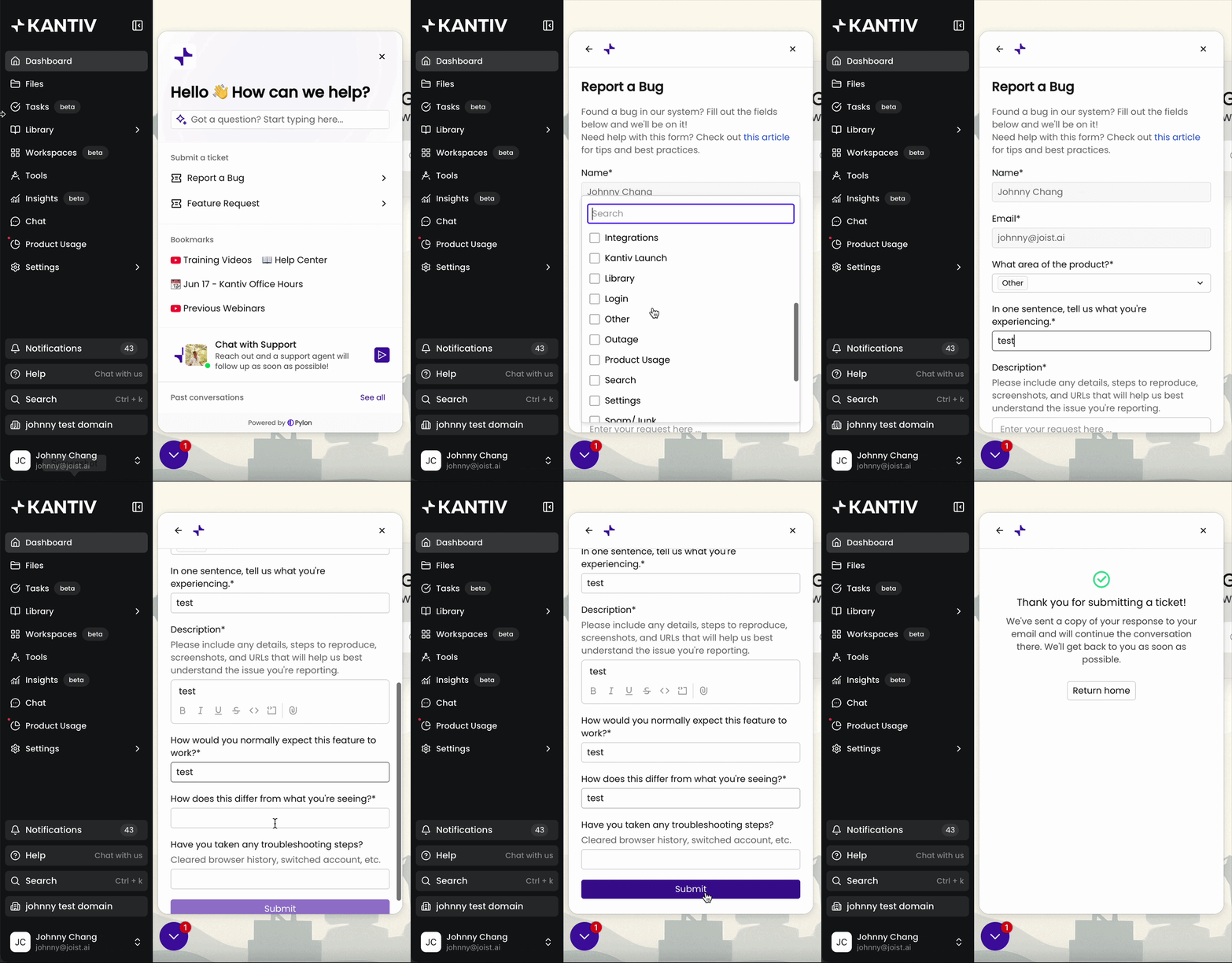
Once completed, you'll receive an email confirmation with the form responses and shortly after, you can expect a follow-up response from our support team. Our support team will either confirm receipt of this or request additional information!
Alternative Reporting Methods
You can also start a chat within the same Help tab to get in touch with our support team. Agents will follow up via chat at their earliest availability.
You can also email support@kantiv.com and your message will show up in our support platforms for an agent to follow up directly via email. Agents will follow up within the same thread and provide updates or request additional information.
Best Practices
When reporting bugs, we recommend including as many helpful details as possible in the initial report so that our team can best understand your experience and triage the issue. Helpful details include:
A one-liner to describe the issue you're experiencing and a description of what you're experiencing that includes the impact on you and your organization
Clear and comprehensible steps to reproduce this issue
A breakdown between expected behavior vs actual behavior
A screenshot or a screen recording to visualize what you're seeing
A list of any troubleshooting steps taken
Any relevant URLs or links that would help us easily navigate to where you're encountering the issue
We know it can be tricky to describe exactly what’s going wrong when you run into a bug. If you’d prefer to talk it through and screenshare, email support@kantiv.com to request a quick troubleshooting call with one of our agents!
Resolution Expectations
Since every issue can differ in cause and complexity, resolution times are handled on a case-by-case basis. Kantiv support will provide you with updates in a timely manner as they receive them from our team.
You can also stay updated with our system performance and outages via our Status page. Our team will update this page to inform users of degraded performance, larger system outages, and resolution statuses.
When you report bugs and bring them to our attention, you help us build a stronger platform that works for everyone. We appreciate your efforts and patience as we continue to improve Kantiv!
You can always find more information on User Resources in our Support Center. Please send any questions or feedback to Support@Kantiv.com.