Reset your Password
Last updated: June 3, 2026
In the rare cases that you forget your password or lose access to your Kantiv account, follow the steps in this article to reset your password and regain access to your account.
Resetting your Password
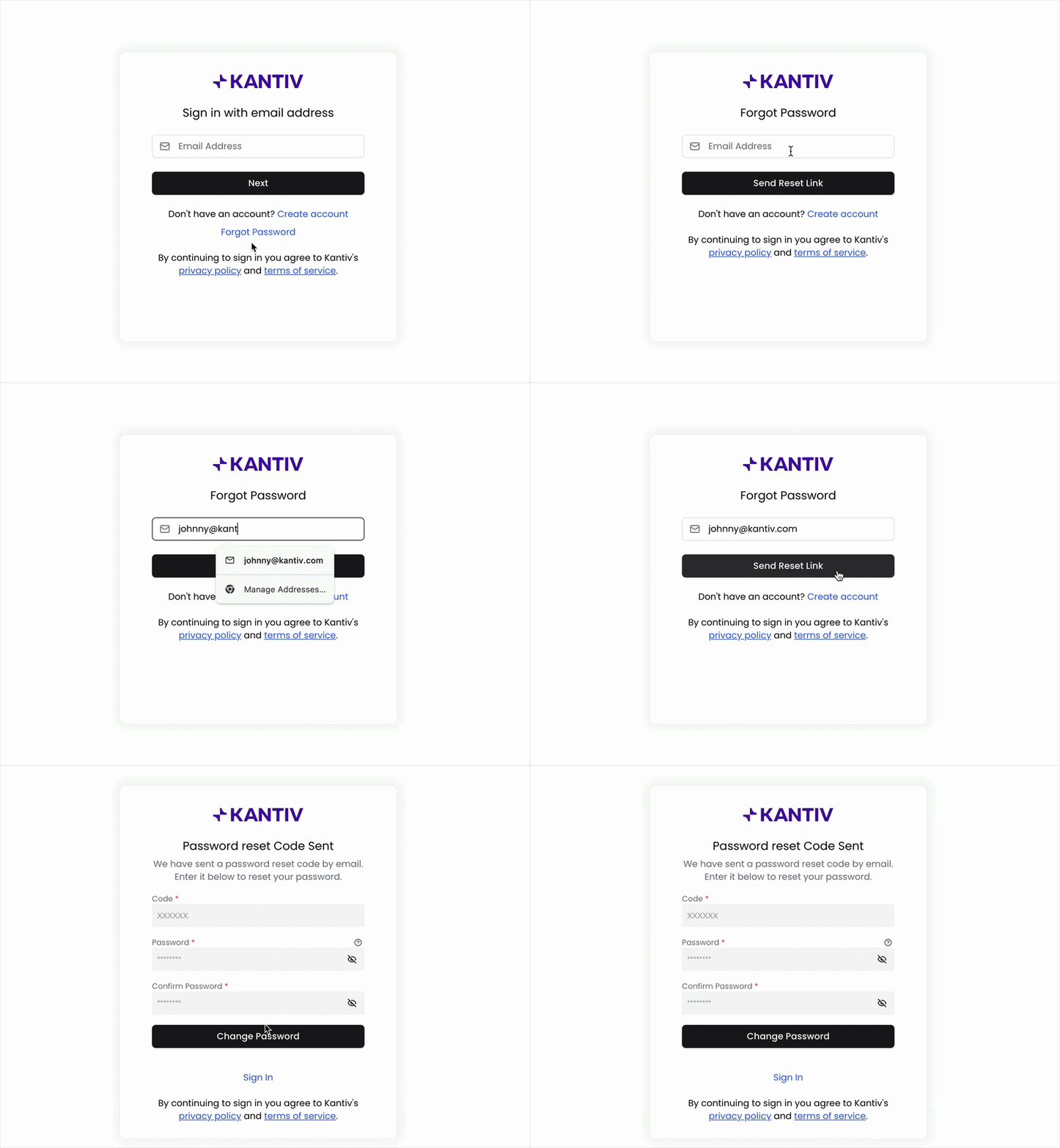
On the Login Page, click Forgot Password.
Enter your email address and click Send Reset Link.
An email will be sent to your inbox with a reset code. Enter the code here and then enter in your new password.
Click Change Password to finalize this process.
You can now use this new password to log into your account!
Password Requirements
Best practice for account safety and security is to have a strong password for your login. Kantiv requires that passwords contains:
8-20 characters
At least one capital letter
At least one lowercase letter
At least one number
At least one special character (ex. !, ?, *, $, etc.)
Emailing Support
Our support team is also here to help you receive access back into your account if needed. Feel free to reach out to support@kantiv.com and we will provide steps to regain access.
You can always find more information on Setup and User Management in our Support Center. Please send any questions or feedback to Support@Kantiv.com.