Analyzing Draft Proposals
Last updated: June 10, 2026
Analyzing your Draft Proposal in Kantiv helps you refine content, strengthen messaging, and ensure your submission meets client expectations. With built-in AI tools, you can uncover key insights, identify areas for improvement, and enhance overall proposal quality—all in one place. This guide walks you through how to upload, analyze, and interpret your Draft Proposal insights to create more strategic and polished responses.
How to Analyze a Draft Proposal
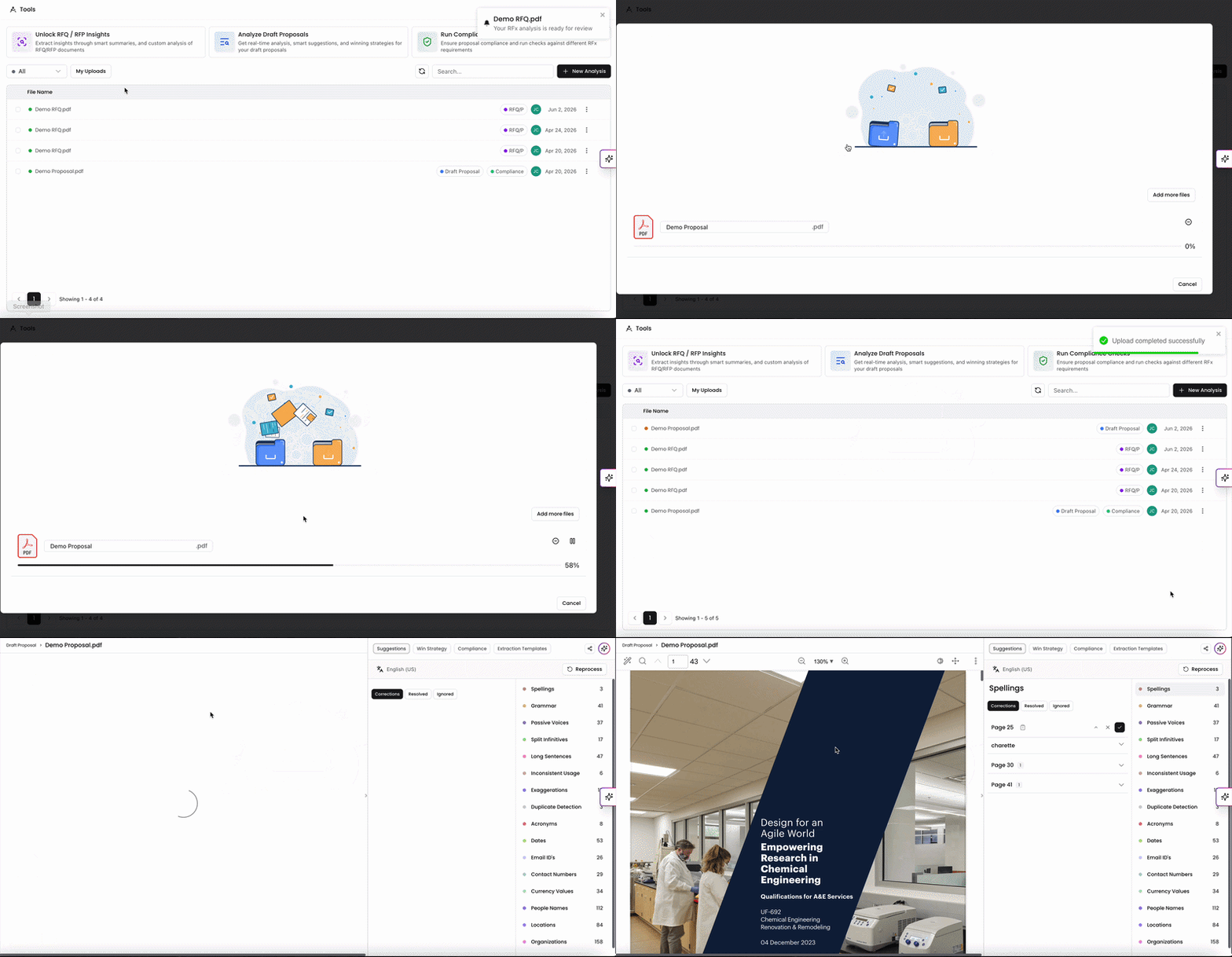
On the Tools page, click Analyze Draft Proposal Insights to open the upload window. You can upload the file from your device or use one of the other sources to upload your Draft Proposal.
Accepted file types include PDF, DOCX, or DOC.
Most files take a few minutes to fully process, but times can vary depending on file size.
Once the file has been uploaded, our AI will process and generate a report with the insights which can be viewed once completed.
You'll see the newly uploaded file in the files list with "Draft Proposal" tagged on the right hand side next to the upload date. While it's still processing, the progress button will be yellow and will turn green once completed. You should receive a notification once it's ready to review.
Understanding your Draft Proposal Analysis
When your Draft Proposal is done processing, you can click on it to view insights on the file. Draft Proposal Analyses are broken down into five sections: Suggestions, Trends, Win Strategy, Compliance, and Templates.
Suggestions: View suggested grammatical and style improvements
Win Strategy: Explore key strategic elements to enhance the document's effectiveness and identify areas for improvement through constructive feedback.
Compliance: Run your Draft Proposal by an RFx file to gain insights on areas of improvement.
Templates: Run your Draft Proposal against a Extraction Template to pull specific information requested.
Suggestions and Text Feedback
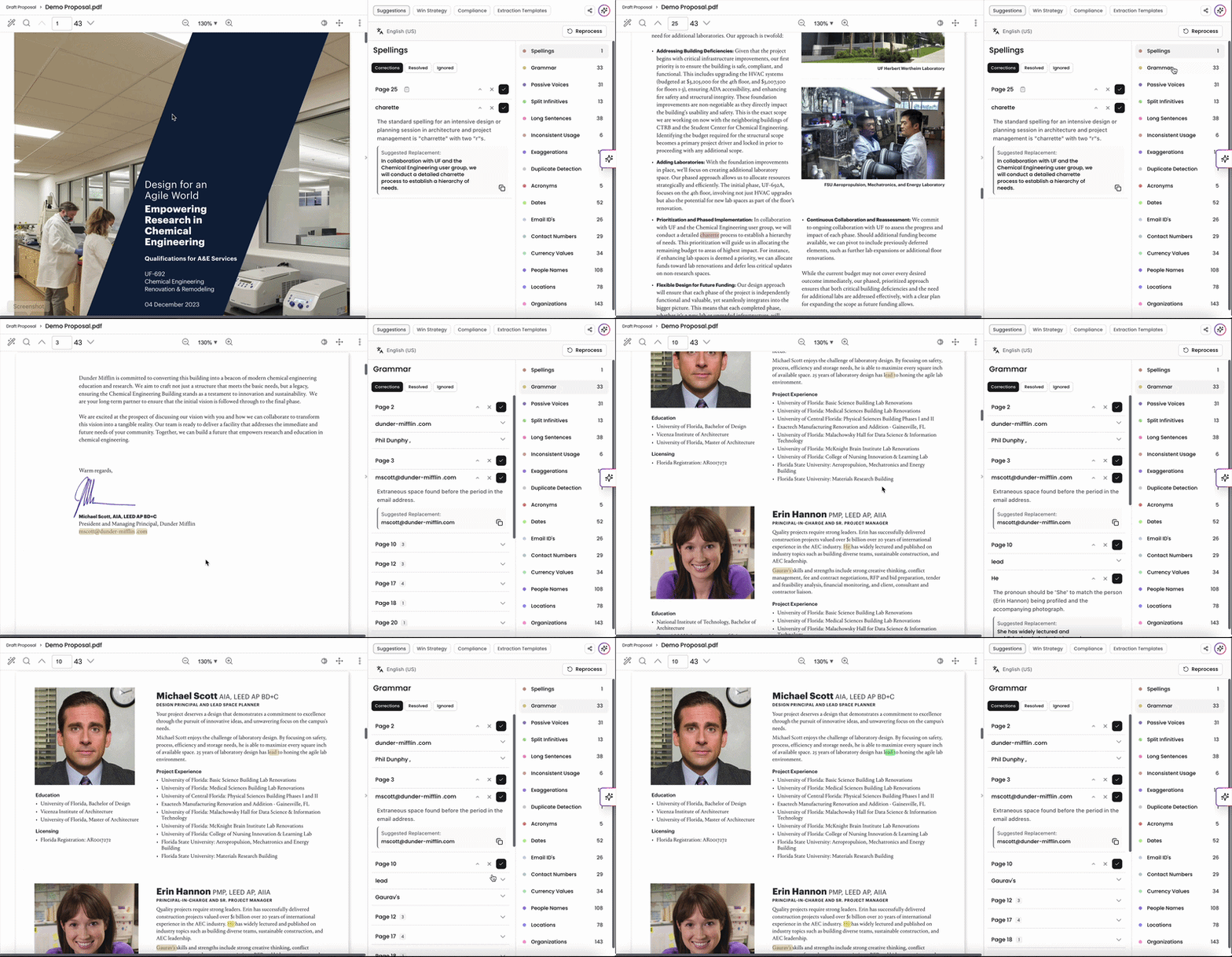
Under Suggestions, you can find recommended grammar and style edits that populated during the analysis. Our system analyzes your document based on a predefined style guide and the edits help ensure style consistency and tone. Depending on the file contents, you'll see recommended edits based on the following elements:
Grammar and Spellings: Ensures correctness in language usage.
Passive Voices: Identifies passive constructions, suggesting active voice alternatives for clarity.
Acronyms and Long Sentences: Identifies potentially confusing acronyms and unwieldy sentences.
Split Infinitives and Currency Values: Highlights split infinitives and checks currency formats for consistency.
Location and People's Names: Verifies the accuracy of geographical and personal names.
Organizations and Contact Numbers: Checks for correct representation of organizational names and formats of contact numbers.
Dates and Emails: Ensures proper formatting of dates and email addresses.
Wordy Phrases and Words to Avoid: Highlights verbosity and suggests concise alternatives.
Suggested edits are highlighted directly within your document for easy reference. Highlighting works for most standard text content. Pages containing scanned images or text embedded within images may not display highlights. In these cases, the suggestion will still appear in the panel but won't be highlighted in the document view.
Trends
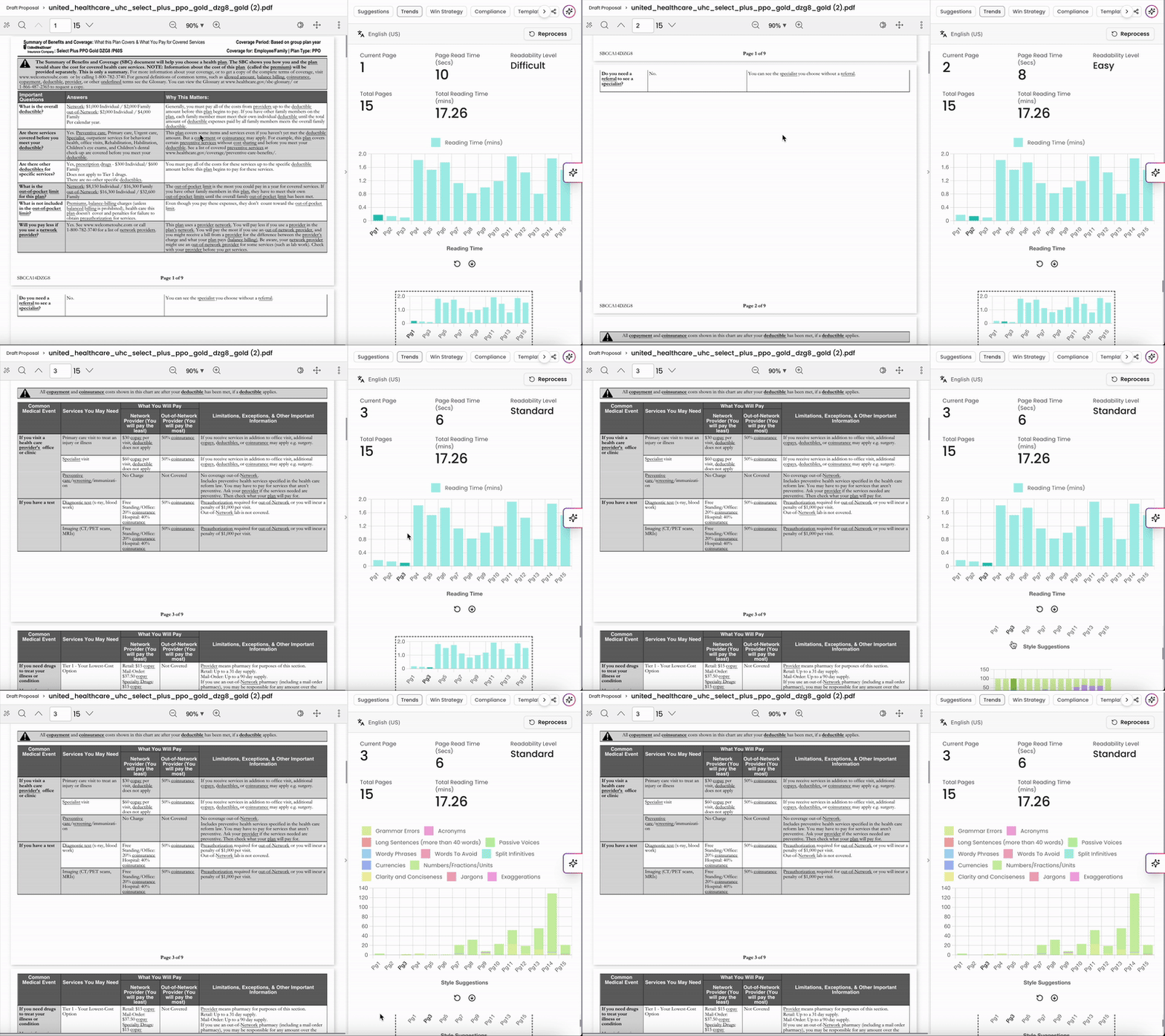
The Trends section has been deprecated for newer uploads, but still exists for Draft Proposals uploaded and processed prior to March 2026.
Under Trends, our system pulls data on overall readability, word count, formatting, and style suggestions from the analysis. Consider the insights in this section to enhance the proposal's readability and presentation:
Readability Level: Assesses the document’s complexity, making it accessible to the intended audience.
Total Reading Time: Estimates the time required to read the document in full.
Text vs Images vs White Space Ratio: Analyzes each page’s layout for optimal balance.
Reading Time Per Page: Provides an estimate of time required to read each page, aiding in pacing the content.
Win Strategy
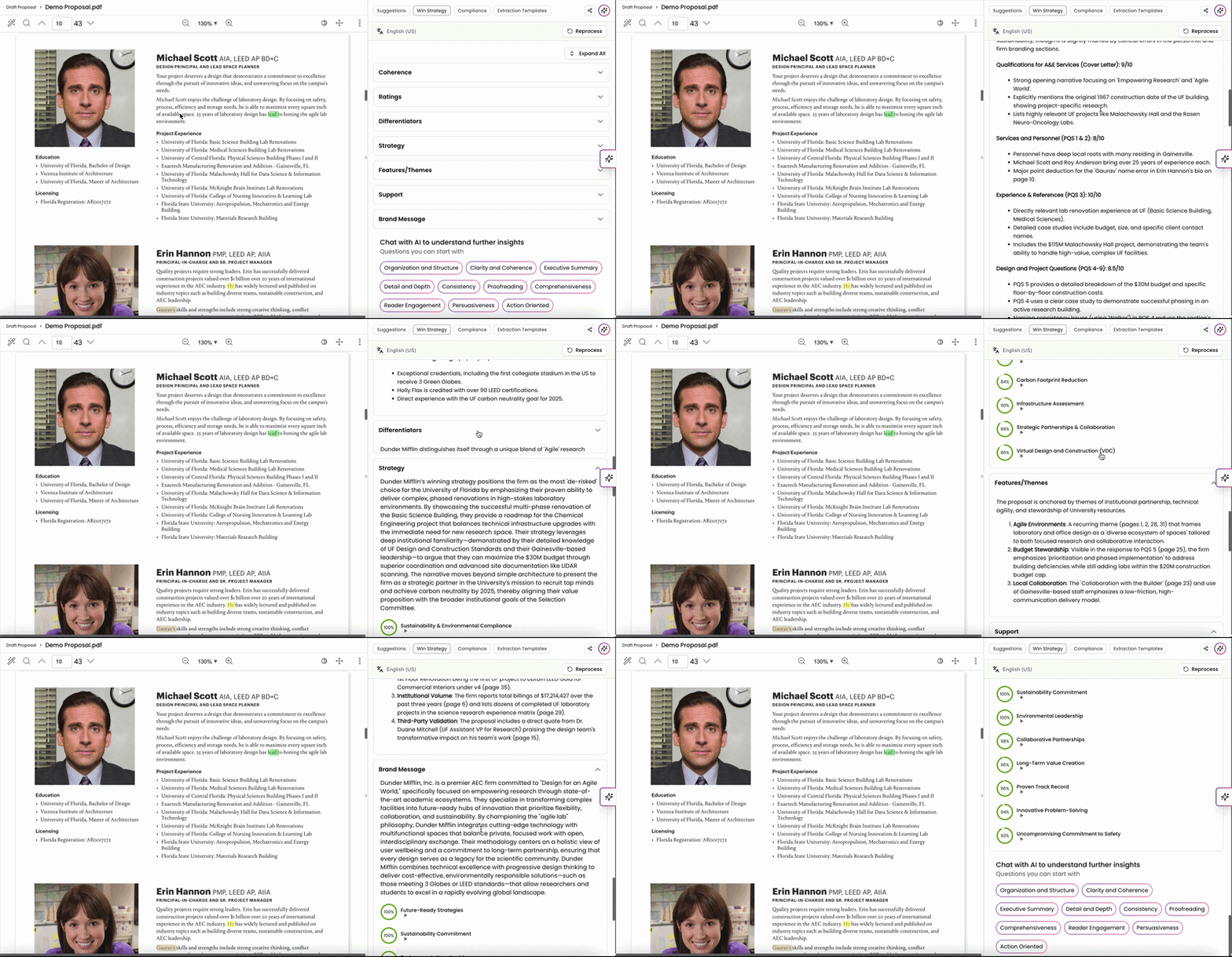
Under Win Strategy, you can view insights on areas of improvement in regards to AEC themes and requirements. You can leverage the AI's recommendations for strategic messaging to strengthen the document's impact.
Coherence Feedback: Evaluates the logical flow and connection between sections.
Ratings for Each Section: Offers a quality score for different parts of the document.
Differentiators and Strategy: Identifies unique points and strategic elements that set the document apart.
Themes: Highlights the most prevalent themes, ensuring alignment with core objectives.
You can also use our Chat feature to ask specific questions regarding any of these criteria and get a better understanding of how to improve your proposal.
Compliance Check
If you have an RFx file uploaded, you can run Compliance Checks to analyze your Draft Proposal against the RFx file. This can help you identify gaps, confirm alignment, and strengthen your response considering the RFx requirements.
For more information on running Compliance Checks, check out this article.
Extraction Templates
If you have Extraction Templates uploaded onto your account, you can run your Draft Proposal against the Extraction Template to extract specific and personalized information from the file.
For more information on Extraction Templates, check out this article.
Draft Proposal Actions
Sharing Draft Proposal Analysis
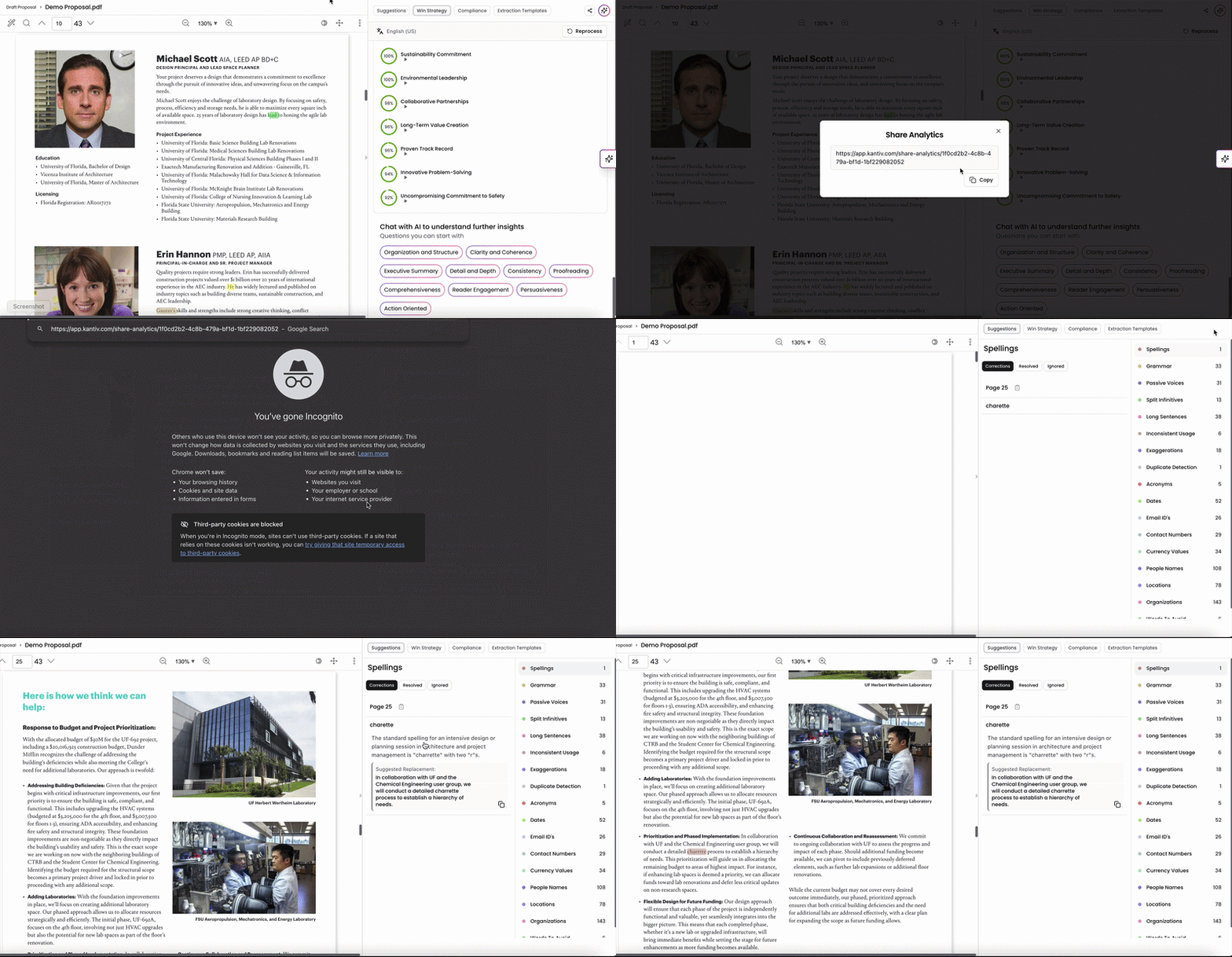
Sharing your Draft Proposal Analysis with others is easy and efficient within the Kantiv platform. You can share the summary generated as well as any templates that the Draft Proposal has been run against. To generate and share a link to the insights:
Click the Share button on the top right when viewing the Draft Proposal analysis.
Set the number of days for the link to stay active and click Create Link.
The link is set to 14 days by default.
The link will generate and you can copy it to send out to others.
Key things to note:
Once the number of days set for the link to stay active has passed, the link will expire and you will have to regenerate a new link.
Access to the Draft Proposal analysis via this link is set to view-only. Viewers will not be able to make edits onto the analysis.
Please note that you don't have to be a Kantiv user to use the link and access the insights.
Reprocessing your Draft Proposal
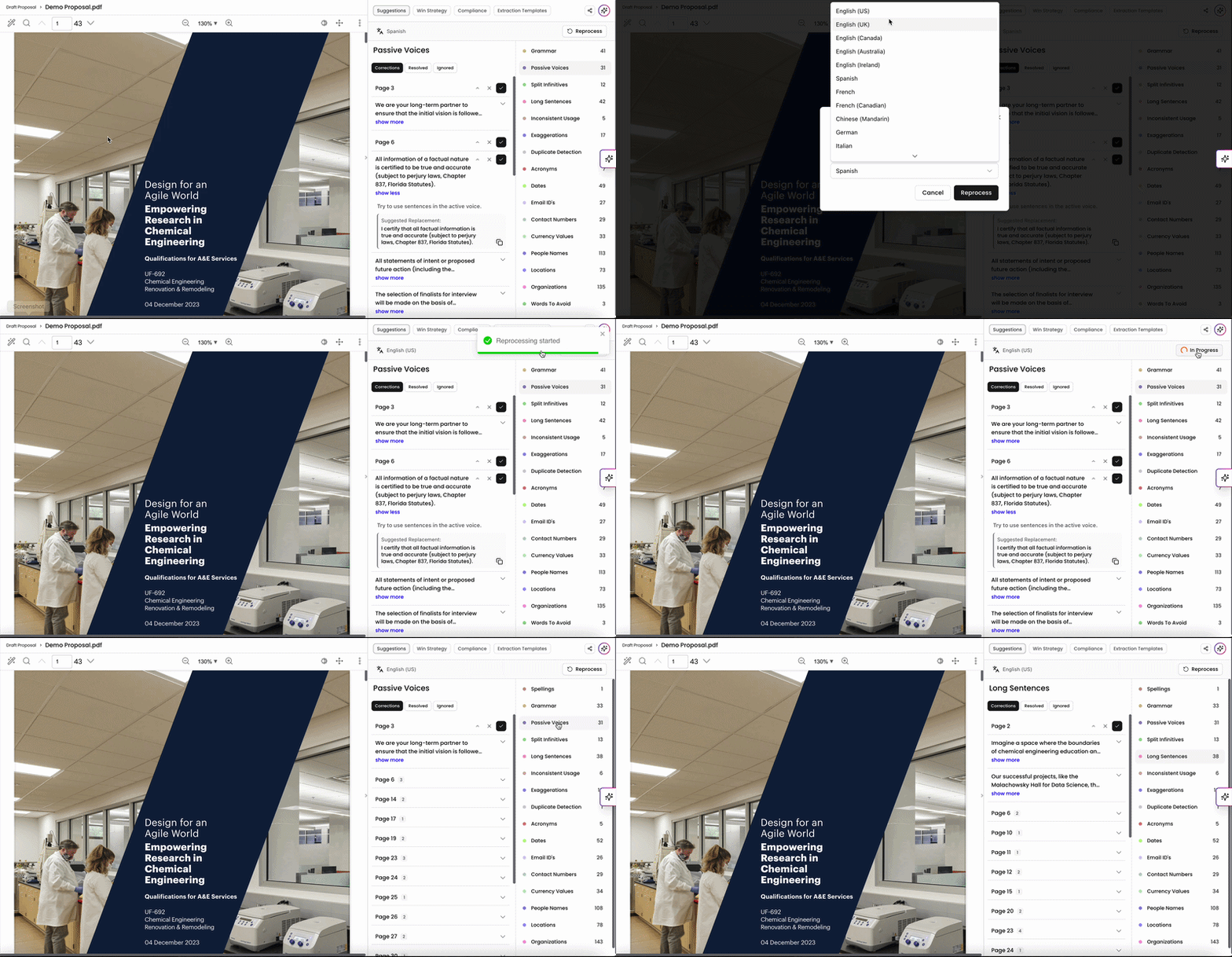
If for any reason you need to reanalyze the Draft Proposal, you can click Reprocess on the top right to reprocess the Draft Proposal file. Here, you can also generate Draft Proposal Analyses in a different language if needed too.
Please note that this will overwrite your existing analysis and replace it with a newly generated version.
Draft Proposal Best Practices
Start Early: Upload the document during the drafting phase to identify and fix issues proactively.
Iterate Often: Use the tool after significant edits to maintain quality throughout the process.
Final Review: Always perform a last check on the day of submission to ensure a polished, error-free proposal.
By analyzing your Draft Proposal with Kantiv, you can elevate the quality and impact of your submissions. The AI-driven insights help you refine content, improve readability, and align closely with RFx requirements—saving time and strengthening your competitive edge. Use these tools throughout the proposal process to ensure your final document is clear, compliant, and compelling.
You can always find more information on Tools and Document Analysis in our Support Center. Please send any questions or feedback to Support@Kantiv.com.