Suggested Proposal Workflow in Kantiv
Last updated: June 2, 2026
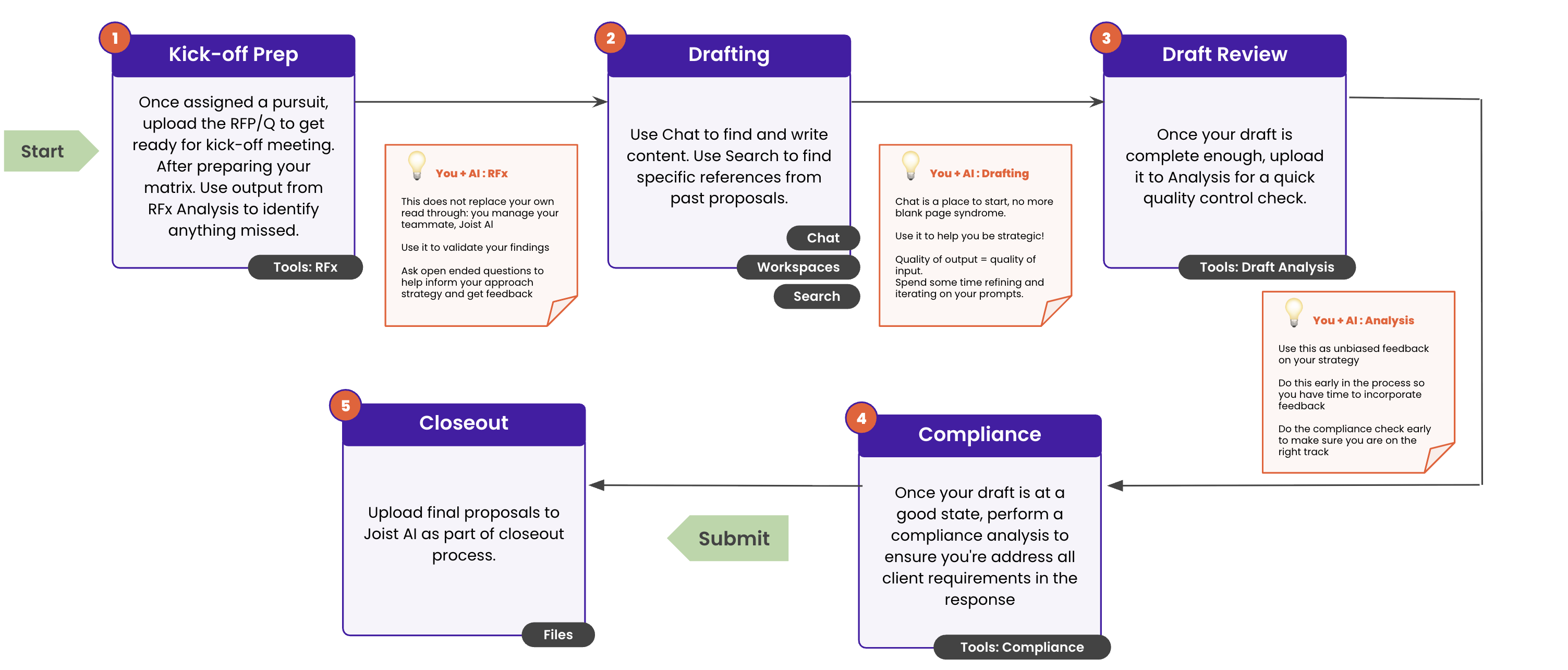
This guide walks you through the full proposal workflow in Kantiv, from initial RFx intake to final submission. Each stage is designed to help teams work more efficiently, improve proposal quality, and reduce risk by using AI strategically throughout the process. Whether you’re preparing for a new pursuit or finalizing a response, this workflow ensures you stay organized, compliant, and confident at every step.
Workflow Overview
Kantiv supports your proposal process from start to finish. The workflow is designed to help teams:
Prepare efficiently for new pursuits.
Draft faster using AI-assisted tools.
Validate quality and compliance early.
Finalize and submit with confidence.
The workflow consists of five key stages:
Each stage builds on the last to ensure accuracy, consistency, and efficiency throughout the proposal lifecycle.
1. Kick-off Prep
Prepare your team and materials for a successful proposal by uploading the RFx, reviewing requirements, and identifying gaps early using RFx Analysis.
How It Works
Once a pursuit is assigned:
Upload the RFx in RFx Analysis on the Tools page.
Use RFx Analysis to:
Identify key requirements
Surface missing or unclear items
Validate your understanding of the scope
If you have an extraction template on your account, you can also apply that onto the RFx Analysis to pull specific information.
Tools Used
Pro-Tips
AI does not replace your review—use it as a second set of eyes.
Ask open-ended questions to validate your approach.
Use insights from RFx Analysis to shape your strategy early.
2. Drafting
Create and refine proposal content using AI-powered drafting tools, past proposal references, and structured workspaces to move from blank page to solid draft faster.
How It Works
During drafting, you can:
Use Chat to generate and refine content
Use Search to reference past proposals
Organize work using Workspaces
Tools Used
Pro-Tips
Start with rough drafts—don’t aim for perfection immediately.
Use strong and specific prompts to improve output quality.
Use AI to accelerate writing, not replace your expertise.
3. Draft Review
Evaluate draft quality and clarity using AI-driven analysis to strengthen messaging and catch issues before moving into compliance.
How It Works
Once your draft is in good shape:
Upload it to Draft Analysis
Review feedback on:
Clarity
Completeness
Strategic alignment
Tools Used
Pro-Tips
Run analysis early enough to have time to make improvements.
Use feedback as guidance, not a final verdict.
Revisit sections that need stronger positioning or detail.
4. Compliance Check
Verify that your proposal meets all client and RFx requirements to reduce risk and ensure alignment before submission.
How It Works
When your draft is nearly final:
Run a Compliance Check
Verify that:
All requirements are addressed.
No sections are missing.
Instructions have been followed.
Tools Used
Pro-Tips
Perform compliance checks before final submission
Use this step to reduce risk and avoid disqualification
5. Closeout
Finalize and upload completed proposal materials to Kantiv for recordkeeping and future reference.
How It Works
Upload final proposal files to Kantiv
Complete the closeout process
Ensure files are saved for future reference and reuse
Tools Used
Key Takeaways
Kantiv supports every phase of the proposal lifecycle.
Our AI tools are designed to enhance human decision-making, not replace it.
Running analysis early leads to better outcomes.
Each tool is designed for a specific stage of the workflow.
Kantiv brings structure, speed, and confidence to the proposal process by supporting every stage from kickoff to closeout. By combining AI-powered analysis with intuitive workflows, teams can reduce manual effort, improve response quality, and ensure compliance without slowing down. Whether you’re managing a single response or multiple pursuits, Kantiv helps you stay organized, informed, and ready to submit with confidence.
You can always find more information on Setup and User Management in our Support Center. Please send any questions or feedback to Support@Kantiv.com.